 Next Matter Pro Academy
Background noise
Fans, traffic, rain and the TV are filtered out before your voice reaches the call, so your questions come through clearly the first time.
Create a free Next Matter Pro Academy account for live training sessions, real work tools and career resources. Sign up free
 Pabulong
Choose Pabulong Mic on your intake calls and client meetings, and the person on the other end hears your voice without the noise in your room.
Version 0.1.3, 8.4 MB. Needs a Mac with Apple silicon and macOS 14 or later. No account needed.
A Windows version is coming soon.
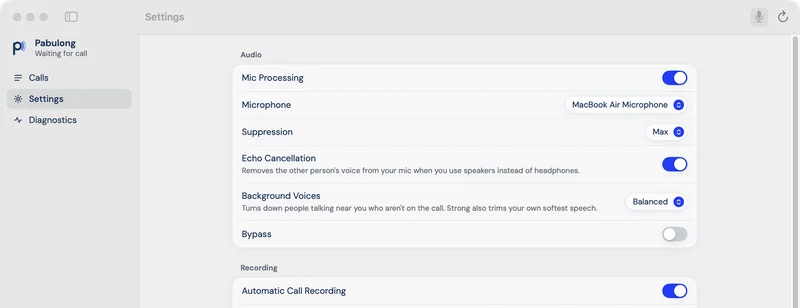
Fans, traffic, rain and the TV are filtered out before your voice reaches the call, so your questions come through clearly the first time.
If you take calls on laptop speakers, the other person's voice can go back into your microphone, and they hear themselves a second later. Pabulong removes that echo, so a US client or attorney hears only you.
When family members are talking in the same room, Pabulong turns their voices down. You choose how much with three levels: Light, Balanced and Strong.
Pabulong can save a call as an audio file on your Mac. Recording is off until you switch it on, and the app reminds you to get consent from everyone on the call. Recording laws differ in the Philippines and between US states, and following them is your responsibility. Check your firm's rules before you record a client call.
Pabulong Mic appears in your Mac's list of microphones. Pick it in the audio settings of Zoom, Google Meet, Microsoft Teams or any other app that lets you choose a microphone. Leave your speaker setting as it is. The person you are calling does not need to install anything.
Pabulong does all of its work on your computer. It goes online only to check for updates, when you ask it to or once a day if you turn that on. Your voice, the sound from your speakers and any recordings stay on your Mac. Calls with a law firm's clients often include accident and medical details, so it helps to know the audio is not sent anywhere. Pabulong asks to hear your speakers only to remove echo.
The steps to uninstall are in the full install guide on VA Starter Hub. By downloading Pabulong you agree to its Terms of Use and Privacy Notice.
If the SHA-256 checksum of your file matches the one below, it is exactly what we published. Run shasum -a 256 ~/Downloads/Pabulong-0.1.3-arm64.pkg in Terminal.
afe7317b45294034b0ccdcb91a36dc338632c0a68e4f0c38bdff539263e1238d Pabulong-0.1.3-arm64.pkgYes, as long as the app runs on your Mac and lets you choose a microphone. Select Pabulong Mic in its audio settings. Calls on a desk phone or your mobile phone do not go through your Mac, so Pabulong cannot help with those.
Pabulong is free. There is no subscription and no account.
A Windows version is coming soon. On Mac, Pabulong needs Apple silicon, so it does not run on Intel Macs. To check your Mac, open the Apple menu and choose About This Mac.
Pabulong removes the echo of the other person coming out of your speakers, so you can take a call without headphones and the other side will not hear themselves. A headset still keeps the caller's voice private from people in your room. If your firm or client asks you to use one, keep using it.
It never uploads anything. Your microphone audio, speaker audio and recordings stay on your Mac. It records only if you turn recording on, and it is off by default. The only thing it does online is check for updates, when you ask it to or once a day if you turn that on.
Download it only from this page, VA Starter Hub or the Pabulong page on GitHub. It is free, so anyone asking you to pay for it did not get it from us. You can also compare the checksum below with your file.
Pabulong is open source and released under the MIT license, so anyone can read its code at github.com/maespela/pabulong. Found a bug or have an idea? Post it on GitHub Issues.
Our other free tools are the resume builder and Manila Paper, a PDF app for Mac and Windows. See all free tools.