 Next Matter Pro Academy
Mac
Apple silicon and Intel Macs.
353 MB
Download for MacCreate a free Next Matter Pro Academy account for live training sessions, real work tools and career resources. Sign up free
 Manila Paper
Edit invoices, sign agreements, search scanned receipts and merge files on your own computer. No monthly fee, and no uploading client files to websites.
You sign in to the app with a free Academy account. Create one or make it in the app the first time you open it.
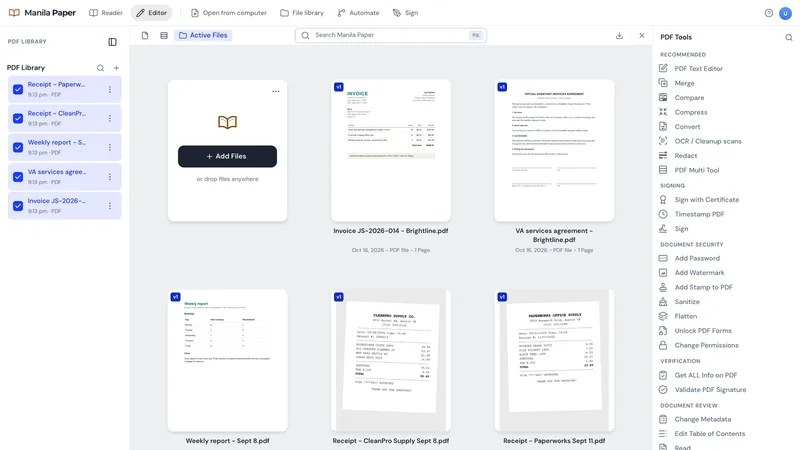
Version 3.3.0. Each download is around 300 MB, so start it on your best connection.
Apple silicon and Intel Macs.
353 MB
Download for Mac64-bit Windows.
301 MB
Download for WindowsOnly if an IT team asked for an MSI.
324 MB
Download the MSIBy downloading Manila Paper you agree to its Terms of Use. The installers are hosted on VA Starter Hub, our resource site.
If the SHA-256 checksum of your file matches the one below, it is exactly what we published. On a Mac, run shasum -a 256 ~/Downloads/manila-paper-3.3.0-mac.dmg in Terminal. On Windows, run Get-FileHash $HOME\Downloads\manila-paper-3.3.0-windows-setup.exe in PowerShell.
811d96a431840cd627da808e3484ca58a0cb71e2008bd6149f1834424c1022a4  manila-paper-3.3.0-mac.dmg
91519edbdf6c4403f778b4ded6b1c8cd013708a04430ddbcfaef76897a1a9329  manila-paper-3.3.0-windows-setup.exe
49881df604de5e6bcfcf1313b988f88826b94ddd08e3301a60483e31a0f07794  manila-paper-3.3.0-windows.msi
Manila Paper is not signed with a paid Apple or Microsoft certificate yet, so the first time you open it your computer asks you to confirm. You only do this once.
Your files stay on your computer. The app goes online only to check your account. OCR on an Intel Mac needs Tesseract installed first. The full guide is on VA Starter Hub.
Made by Next Matter Pro. Manila Paper is built on an open-source PDF project released under the MIT license, credited inside the app. Found a bug? Email us.