 Next Matter Pro Academy
Personal injury intake call practice
You answer a call from someone hurt in a car accident and fill in a law firm's intake form while they talk. The desk is practice for Academy students preparing for remote intake work at US personal injury law firms.
What happens on a practice call
You take a phone call from someone who was hurt in a car accident, and you fill in the firm's intake form while you talk, the way an intake specialist does at a personal injury firm.
Each caller has their own story and their own mood, so no two calls go the same way. A coach walks you through your first one. After that you handle the calls on your own, and your trainer reviews how each one went.
What you ask on a PI intake call
The intake form has 41 fields, and you type into it while you talk. The questions fall into five groups.
- Contact
- Full name, date of birth, phone, email, home address, the best time to call, and how they heard about the firm.
- The accident
- Date and time, location, type of crash, the caller's role in it, seatbelt, police report and report number, any ticket, the other driver's name, witnesses, photos, and damage to the caller's vehicle.
- Injuries and treatment
- Injuries, pain level from 0 to 10, ambulance or ER at the scene, treatment so far, doctors and clinics, the next appointment, and missed work.
- Insurance
- The other driver's insurance and claim number, the caller's own auto policy, health insurance, any contact from an adjuster or a recorded statement, and whether they've signed anything with an insurer.
- Screening
- Who was at fault, whether they already have a lawyer, prior injuries or accidents, and the accident date checked against the filing deadline.
At the bottom of the form you record a booked consultation or a transfer, and you write notes for the attorney.
Booking consultations and warm transfers
Booking the consultation
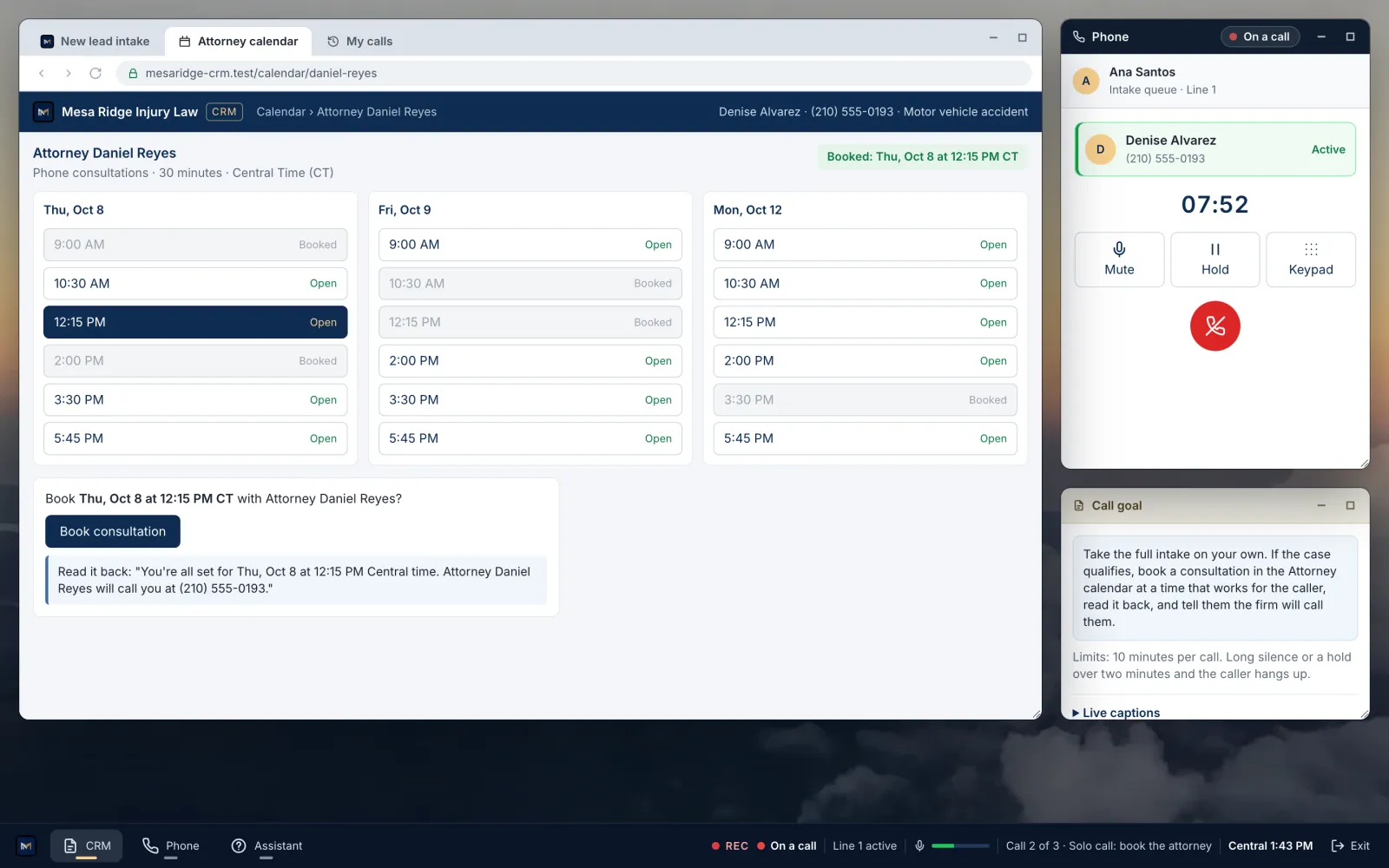
When a case qualifies, you book a consultation on the attorney's calendar at a time the caller can take it. Then you read it back to them: the day, the time in Central, the phone number, and that the firm will call them.
Warm transfer to the attorney
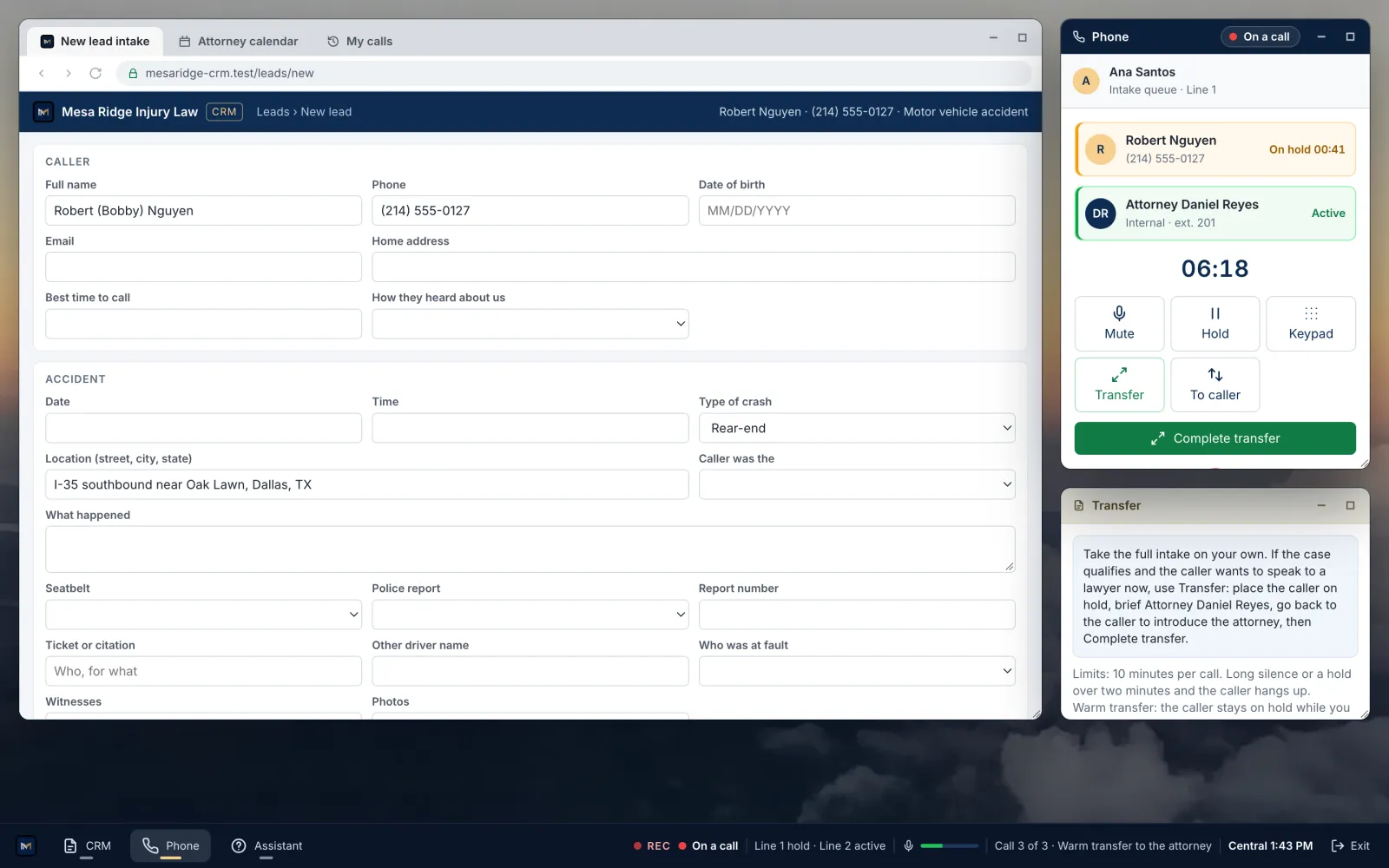
On some calls you hand the caller to the attorney while they stay on the line. You ask before placing them on hold and tell them why.
On a second line, you brief the attorney on the caller's name, the accident, fault, injuries, treatment, insurance and urgency. Then you introduce the attorney to the caller and complete the transfer.
When a case doesn't qualify
Some cases qualify and some don't, and your screening questions tell you which. When the call ends, you set the disposition: qualified, consultation scheduled, transferred, not qualified, callback, or attorney review.
Then you tell the caller what happens next before you close the call.
When the caller asks what the case is worth
Some callers ask what their case is worth. You tell them it's a question for the attorney, and you don't promise an outcome.
Giving no legal advice or promises is part of your score.
How each call is scored
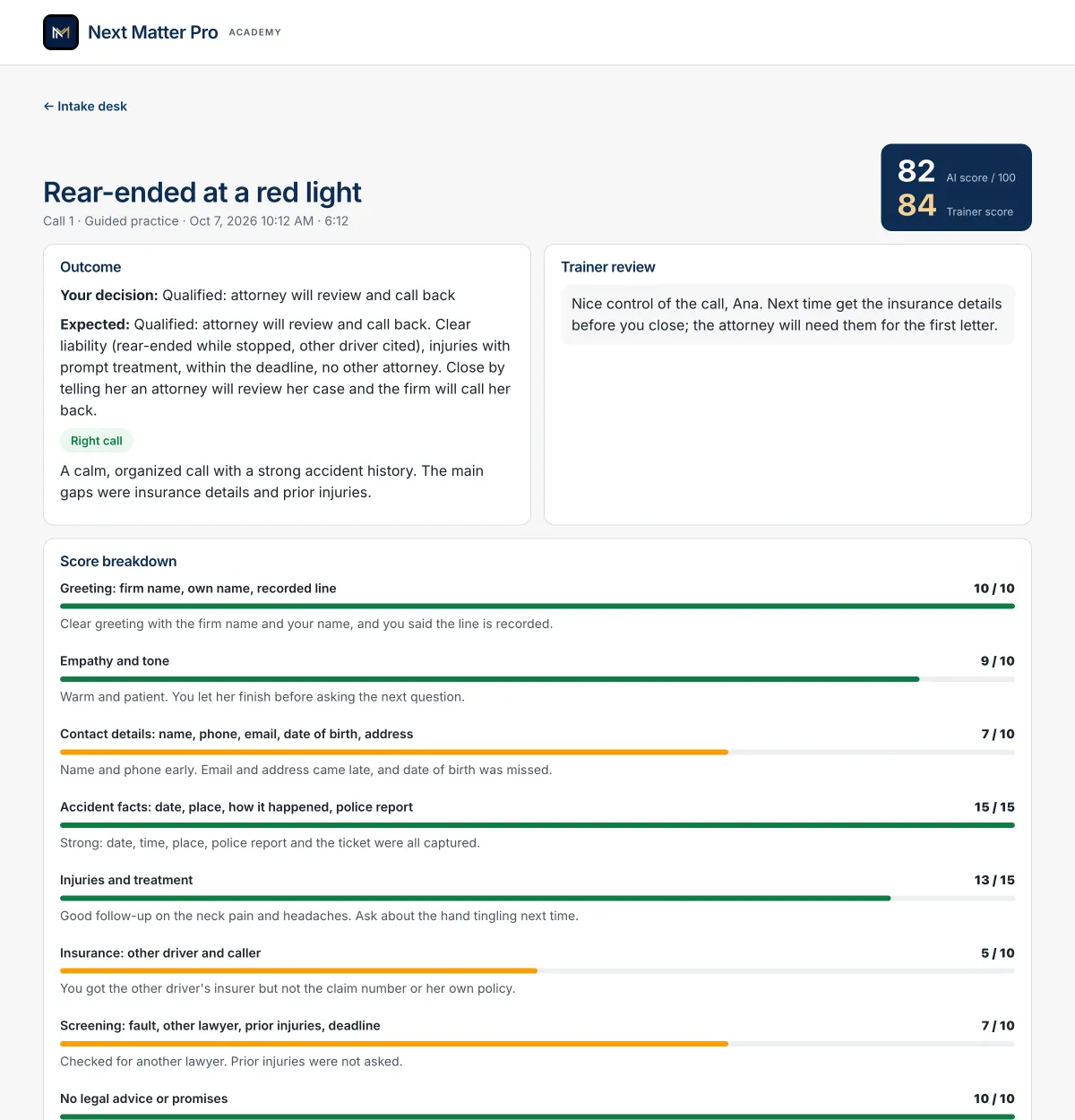
Calls are recorded and transcribed. When you hang up, you get a score out of 100 with comments on each part of the call. Your trainer then listens to the recording and adds feedback. Only you and your trainers can play it.
Your trainer can also reopen a call for another try. This is the checklist for your first call:
- 10Greeting: firm name, own name, recorded line
- 10Empathy and tone
- 10Contact details: name, phone, email, date of birth, address
- 15Accident facts: date, place, how it happened, police report
- 15Injuries and treatment
- 10Insurance: other driver and caller
- 10Screening: fault, other lawyer, prior injuries, deadline
- 10No legal advice or promises
- 5Intake form matches the call
- 5Clear next steps and close
Before your first call
A computer and a headset
Use a laptop or desktop with Chrome or Edge, and a headset with a microphone. The desk opens on a phone, but the screen is too small to type the intake while you talk.
Where you'll find it
Your trainer assigns the desk to your class or to you. It appears on your Classes page and in the Academy Android app. You also get a push notification.
Classes that include the desk
The intake desk comes with these live classes:
Questions
What questions does a PI intake specialist ask?
On the desk, the questions follow the firm's intake form. It covers five areas: contact details, the accident, injuries and treatment, insurance, and screening questions such as fault and whether the caller already has a lawyer.
How long is an intake call?
Calls on the desk stop at 10 minutes. Most intake calls take five to eight.
Can I tell a caller what their case is worth?
No. That question goes to the attorney. Giving no legal advice or promises is part of your score.
What is a warm transfer at a law firm?
You hand the caller to the attorney while they stay on the line. You put them on hold and brief the attorney on a second line. Then you introduce the attorney and connect the call.
Do I need to know PI law first?
No. Your first call has an on-screen coach that shows what to ask next, and you take later calls without it.
Are the callers simulated?
Yes. The callers and their cases are fictional. The caller's voice and the transcript run on Google's Gemini service.
Who can hear my recording?
Only you and your trainers. Calls are recorded and transcribed for your review, and nobody else can play them.
Can I redo a call?
Yes. Your trainer can reopen a call so you can take it again.
Will this get me a job?
No. Next Matter Pro Academy provides training. It does not guarantee employment.
Next Matter Pro Academy provides training. It does not guarantee employment, and creating an account, enrolling, or using the portal does not create an employer-employee relationship. Practice calls are simulated, with fictional callers and cases.